Showcase
This page is the spike’s proof, not a product feature. It shows the projection that turns selected repository files into site pages, and the rich-content pieces the site supports: Mermaid diagrams in four diagram types, a local image, native HTML disclosure, and one small Svelte component.
Every mermaid fence here is rendered to inline SVG by Pele while the site builds, so the diagram is
part of the page’s own HTML: it needs no browser renderer, no network request, and no JavaScript. The
diagrams follow the page’s light and dark theme through CSS variables.
How the sample is built
Section titled “How the sample is built”The repository Markdown stays canonical. At build time, an explicit list of source files is copied
into the content collection with the title Starlight requires and an editUrl that points at the
original file; the original YAML frontmatter and level-1 heading are dropped, and relative link
destinations are resolved. Nothing else changes. The originals are never modified, and the projected
copies are ignored build output.
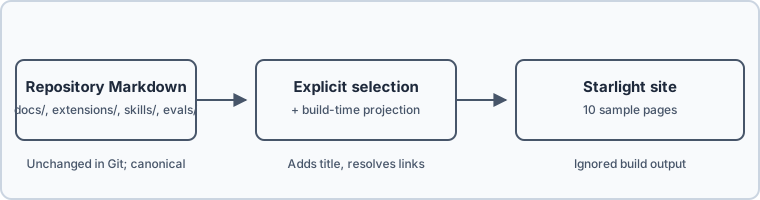
What the projection rewrites, and what it leaves alone
- A relative link to a page in the sample becomes that page’s site route, keeping any
#fragment. - A relative link to any other file — code, tests, configuration, or a document outside the sample — becomes an explicit link to that file on GitHub at the configured ref.
- An image under
docs/assets/is copied into the site and served from/content/…; an image outside that directory, or one that is not an image file, stays a GitHub raw link instead of being copied. A link to a directory becomes a GitHub tree link. - Links with a scheme, protocol-relative links, and same-page
#anchorsare left untouched. - Unknown targets are reported in the build log instead of being dropped, and the build continues.
- Body prose, tables, and code blocks are copied byte for byte; only link destinations are replaced.
Other diagram types
Section titled “Other diagram types”These three fences exist to prove that the build renders more than flowcharts. Each one uses the placeholder example from Mermaid’s own documentation for that type, so nothing here is a MyPi contract or a description of this repository’s behavior. The runtime object model and each package README own the real behavior.
Class diagram
Section titled “Class diagram”A class diagram draws types and their relationships.
Sequence diagram
Section titled “Sequence diagram”A sequence diagram draws messages between participants over time.
State diagram
Section titled “State diagram”A state diagram draws the states a thing moves through and the transitions between them.
The selected pages
Section titled “The selected pages”This table is rendered by one Svelte component over the same manifest the projection uses. It is here to prove that Svelte is wired into the content pipeline, not to become a page browser. With JavaScript disabled the page still reads: the component renders its full table on the server.
Showing 10 of 10 pages.
| Section | Original file | Site route |
|---|---|---|
| Documentation | docs/README.md | / |
| Understand MyPi | docs/architecture.md | /docs/architecture/ |
| Understand MyPi | docs/glossary.md | /docs/glossary/ |
| Understand MyPi | docs/object-model.md | /docs/object-model/ |
| Extensions | extensions/README.md | /extensions/ |
| Extensions | extensions/packages/async-tasks/README.md | /extensions/packages/async-tasks/ |
| Extensions | extensions/packages/async-tasks/subagents/README.md | /extensions/packages/async-tasks/subagents/ |
| Apps | apps/my-tui/docs/object-model.md | /apps/my-tui/docs/object-model/ |
| Skills | skills/engineering/engineer/SKILL.md | /skills/engineering/engineer/ |
| Development | evals/README.md | /evals/ |